
On October 20, 2026, the QR payment service teppay was added inside Mobile Suica. JR East announced the date on October 6, with rollout starting from 11:00 Japan time on the 20th. However, teppay’s membership terms state that the service is for residents of Japan, so travelers are not covered, and foreign residents who top up from a bank account face an ID requirement. This guide covers paying in Japan for three kinds of people (short-term visitors, students and workers, and long-term residents) and explains how to choose and start with Suica, PASMO, ICOCA, PayPay, teppay and credit cards.
The short answer: a short-term visitor should rely on cash plus an accepted overseas credit card, and use Welcome Suica, TOURIST PASMO or an ordinary transit IC card for transport. PayPay and teppay are both aimed at residents of Japan, and having a Japanese phone number does not mean you qualify. Students, workers and long-term residents fall within the groups these two services are meant for, but whether you can activate them depends on checking, item by item, the version and validity of your residence card, a My Number card, a Japanese phone number and a bank account in your own name.
This guide answers:
- Are you a traveler, a student or worker, or a long-term resident, and what can each use to pay?
- How do Welcome Suica, TOURIST PASMO and the visitor ICOCA differ, and can leftover balances be refunded?
- What ID do foreigners need to apply for PayPay and teppay? Does a residence card work?
- How can tools from home (Octopus, EasyCard, EZ-Link, Touch ‘n Go, Alipay, WeChat Pay) be used in Japan?
Currency exchange, ATM fees and tax refunds on purchases are not repeated here; see the Japan currency exchange guide.
Key Points
- Who this is for: Visitors on tourism or family trips, including holders of Hong Kong, Taiwan, mainland China, Singapore and Malaysia passports, and overseas readers who come to Japan to study, work, live long term, or buy or rent a home.
- PayPay and teppay depend on residency: Both are aimed at residents of Japan. A traveler who buys a Japanese number that can receive text messages still does not meet the application conditions.
- PayPay and the new residence card: As of October 31, 2026, residence cards and special permanent resident certificates issued from June 14, 2026 are not yet accepted, and no date has been set.
- teppay bank top-ups: The bank registration guide requires identity verification first, and the only document listed for verification is a My Number card; a residence card or passport cannot be used. A separate limits table on the official site is worded differently, so it should not be treated as a route that skips verification.
- Transit IC cards depend on the version: The physical Welcome Suica and TOURIST PASMO are valid for 28 days and Welcome Suica Mobile for 180 days; none of the three offers a general refund of the remaining balance.
- Tools from home depend on the product: Octopus and Touch ‘n Go pay in Japan by scanning a QR code in a phone wallet, and EZ-Link is a virtual Mastercard. A physical card does not mean you can tap Japanese ticket gates.
Work Out Which Type You Are
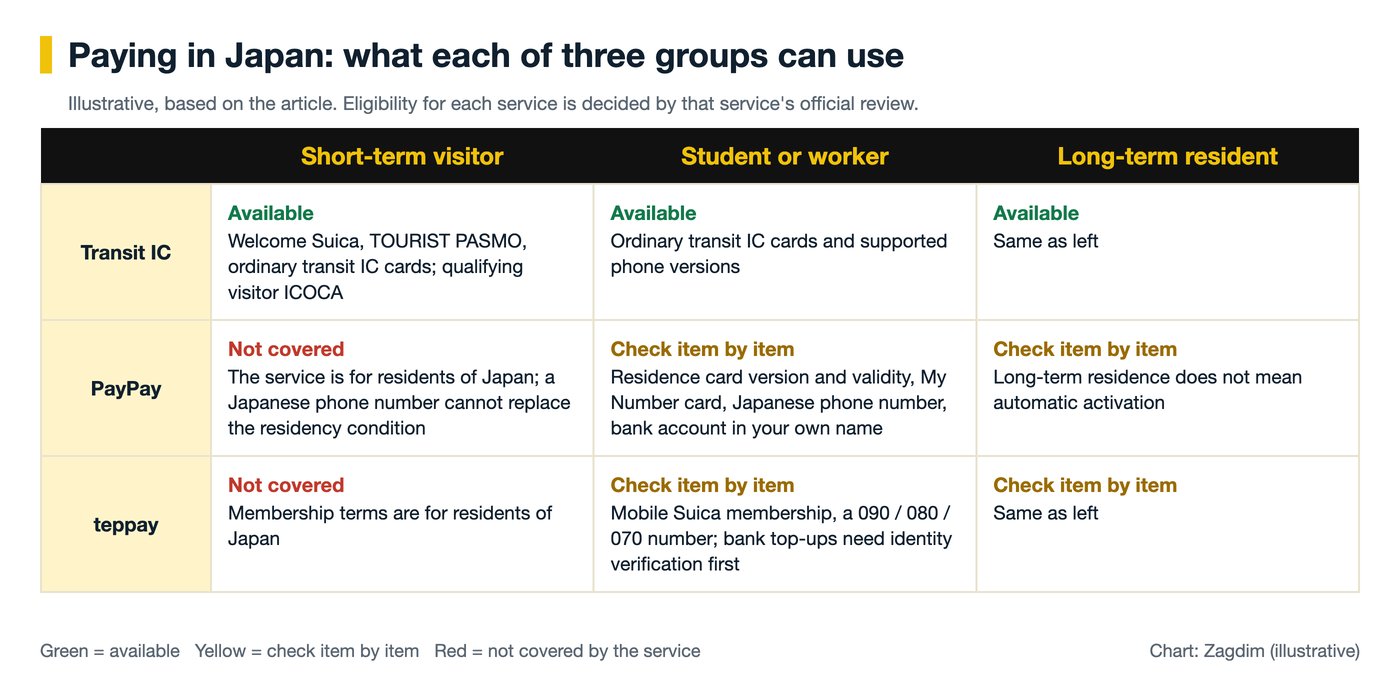
Short-term visitors, students and workers, and long-term residents each have a different set of routes, as the table shows.
| Your situation | Routes you can take | What you cannot skip checking |
|---|---|---|
| Short-term visitor | Cash, accepted overseas credit cards, an ordinary transit IC card, Welcome Suica, TOURIST PASMO, a qualifying visitor ICOCA, wallets from home that are already enabled | Card validity and refund rules, phone and card compatibility; the residency requirement of PayPay and teppay cannot be replaced by a Japanese text-message number |
| Student or worker | An ordinary transit IC card and supported phone versions, a bank account, PayPay or teppay if you meet the conditions | Status of residence, version and remaining validity of your ID, the electronic certificate on your My Number card, a text-message number, a bank account in your own name |
| Long-term resident | The above, plus bank direct debit and bank-accepted debit cards | Long-term residence does not mean each service activates automatically; address and residence data updates, bank screening and the type of balance all need handling |
This table is a reading route, not an approval of your personal eligibility.
Payment Methods Compared
Cash and an accepted overseas credit card work for everyone, while PayPay and teppay are for residents of Japan.
| Payment method | Who can use it | What to prepare | Where it works |
|---|---|---|---|
| Cash | Everyone | Yen | A fallback when card payments fail; whether a shop accepts it is as seen on site |
| Overseas credit card | People holding an accepted card | A card with the contactless symbol for tap payment | Shops showing the matching symbol; designated gates on Tokyo Metro |
| Ordinary Suica, PASMO and ICOCA physical cards | Visitors and residents | Purchase includes a 500 yen deposit; a registered PASMO requires your own details | Participating lines and shops in the interoperability scheme |
| Welcome Suica, TOURIST PASMO | Short-term visitors | The physical Welcome Suica can be topped up only with cash | Participating lines and shops in the interoperability scheme |
| Phone versions of Suica, PASMO and ICOCA | People with compatible device and payment card | A supported phone; a supported credit or prepaid card in Apple Wallet | Participating lines and shops in the interoperability scheme |
| PayPay | Residents within Japan | A Japanese number that can receive text messages; bank top-ups require identity verification | PayPay merchants |
| teppay | Residents of Japan | Mobile Suica membership, a number starting with 090, 080 or 070; bank top-ups are covered below | Within Japan |
| Wallets from home | People whose account has overseas payment enabled | Per each wallet’s conditions | Japanese shops that have enabled the service |
How to Get Started With Each
Zagdim recommends starting with cash, a card and a transit IC card, and adding PayPay or teppay only if you are a resident who meets the conditions.
Cash: Do You Still Need to Carry It?
Yes, carry some. The Japan National Tourism Organization advises that card errors can occur in some places and travelers should have cash as a substitute. The physical Welcome Suica can also be topped up only with cash.
There is one detail about small coins: the Bank of Japan explains that banknotes have no limit on the number of notes accepted as legal tender, while coins are limited to 20 coins of the same denomination in a single payment. This describes legal tender and does not mean every shop must accept cash.
For how much to bring, where to exchange and which ATMs can withdraw cash, see the Japan currency exchange guide.
Credit Cards: How Does Tap Payment Work?
Check two things first: both the card and the shop need to show the contactless symbol. Visa Japan’s website notes that, depending on the shop or terminal, you may need to say “Visa wo touch de” (tap with Visa) at checkout.
Tokyo Metro accepts tap payment with credit cards and similar, with no prior registration, under four conditions:
- You need a supported card or device and use a gate with the designated reader.
- Fares are charged at the ordinary paper ticket fare, in units of 10 yen.
- Only adult fares are available; child and discounted fares must be checked separately.
- Several people cannot share one card to pass through the gate.
This is a Tokyo Metro service, not a rule for all rail in Japan; check other lines separately. If the screen asks which currency to pay in when you pay by card or withdraw cash, Visa rules require shops and ATMs to let the cardholder choose; how to compare is covered in the currency exchange guide. Overseas transaction fees on credit cards vary by issuing bank, so Zagdim recommends checking with your issuer before you leave.
Transit IC Cards: Which One for a Short-Term Visitor?
A short-term visitor can choose Welcome Suica, TOURIST PASMO or a qualifying visitor ICOCA, and the physical Welcome Suica and TOURIST PASMO are valid for 28 days.
| Card | Validity | Deposit | How to top up | Leftover money |
|---|---|---|---|---|
| Welcome Suica (physical) | 28 days from purchase | None | Cash only, no credit card | Not refunded when the trip ends |
| Welcome Suica Mobile (iOS app) | 180 days from issue | See the app | See the app | Unused balance is not refunded after expiry |
| TOURIST PASMO | 28 days from purchase | None | See the official website; buying the card by credit card does not mean you can top up by credit card | Not refunded when no longer needed |
| Visitor ICOCA | Confirm at purchase | Includes 500 yen | Physical-card ticket machines do not accept credit cards | Confirm at purchase |
| Ordinary Suica | Per card rules | 500 yen | Cash, not credit card | Refunded less a 220 yen fee, plus the deposit |
| Ordinary PASMO | Per card rules | 500 yen | See the official website | Card return fee of 220 yen, plus the deposit refunded |
| Ordinary ICOCA | Per card rules | 500 yen | Ticket machines do not accept credit cards | Refunded less a 220 yen fee, plus the deposit |
Key points when choosing:
- If you will be coming back: An ordinary card lets you get the deposit and balance back, but when the balance is 220 yen or less, Suica and ICOCA refund only the deposit; for PASMO, a balance under 220 yen is taken entirely as the fee.
- Balance cap on physical cards: Ordinary Suica and ICOCA are both capped at 20,000 yen.
- Do not mix up the visitor product names: The physical Welcome Suica is 28 days, and the phone version is 180 days. The old PASMO PASSPORT was discontinued in 2024, and the current visitor product is TOURIST PASMO.
- Where to buy TOURIST PASMO: The official site states that the designated Keikyu visitor ticket machines at Haneda Airport accept credit cards for buying the card. For other sales points and payment methods, go by the official website.
- Who qualifies for the visitor ICOCA: You must hold a passport not issued by the Japanese government and enter with “temporary visitor” status. It is sold at the green window at Kansai Airport Station, limited to 1 per person, at 2,000 yen including a 500 yen deposit. The condition is written as “temporary visitor” status; students, workers and other residence statuses do not meet it and should buy an ordinary ICOCA.
Ordinary Transit IC Cards and Phone Versions: Students, Workers and Long-Term Residents
Physical cards are the simplest. The official example for an ordinary ICOCA is to pay 2,000 yen, of which 500 yen is the deposit and 1,500 yen is usable balance; an ordinary physical ICOCA cannot be bought by credit card. PASMO has a registered card, where you register name, date of birth, gender and phone number, for your own use only; a lost card can be reissued for a fee under the rules.
Phone versions first need to pass the device check:
- iPhone and Apple Watch: ICOCA can be added to Apple Wallet on supported devices, and whether you can top up depends on a compatible device, Apple Pay settings and the payment card. Apple explains that topping up Suica, PASMO or ICOCA in Wallet requires a supported credit or prepaid card in Wallet.
- Android: The PASMO website says that, in general, Android devices bought outside Japan are not compatible with Mobile PASMO. If you bring an overseas phone to Japan, do not assume you can install it.
That a physical card cannot be topped up by credit card does not mean the phone version cannot; judge the two separately.
PayPay: Who Can Use It and What ID Is Needed?
Short-term visitors: PayPay’s official site states that the service is for residents within Japan. It requires a Japanese phone number that can receive text messages on the device you use; overseas numbers do not work. But merely obtaining a Japanese number does not mean a visitor meets the application conditions.
Foreigners living in Japan: You can apply and can complete identity verification, but check each item in the table below.
| Situation | Current rule |
|---|---|
| People without an indefinite period of residence | Confirm your period of residence using the designated My Number card verification method, a residence card or a special permanent resident certificate |
| Verifying with a residence card | At the time of application, the card must have at least 90 days of validity remaining |
| Residence cards and special permanent resident certificates issued from June 14, 2026 | Not accepted as of October 31, 2026, and no date has been set; the official site points to a My Number card as the alternative |
| Passport | Not on the current list of accepted documents |
| Minors | Separate age and document conditions; check the latest FAQ before applying for a child |
The verification methods are changing: PayPay announced on October 23, 2026 that it will stop the photo-based application method for designated documents by early November the same year and switch to IC chip reading. Early November is the announced target, not a single confirmed effective date, and the change does not mean foreigners’ documents are all being withdrawn. Be careful with document lists in older guides.
Banks and balances: Before registering a bank account, you must complete identity verification and link a supported bank account in your own name. Also note the types of balance: PayPay Money Lite you held before verification does not become withdrawable PayPay Money after verification.
teppay: How to Read the Identity Check for Bank Top-Ups
Bank top-ups require identity verification first, and the only document listed for verification is a My Number card.
Short-term visitors: Not covered. The membership terms state that the service is for residents of Japan and for use within Japan only; a visitor is not a resident, and a Japanese phone number cannot replace that condition.
People living in Japan: The way to activate it is through the Mobile Suica app. Support for Mobile PASMO is planned for spring 2027 and cannot be used yet. If all you have is a physical Suica or Welcome Suica Mobile, do not assume it can be activated.
The official explanations for bank-account top-ups currently disagree in places, so read them separately:
- Bank registration guide: Before registering a financial institution, you must complete identity verification.
- Verification document FAQ: Only a My Number card with a signature electronic certificate is accepted; foreign nationals cannot complete verification with a residence card or passport.
- Top-up limits table: The limits chart in the official FAQ lists a bank top-up allowance for people who “have not completed identity verification,” which does not match the bank registration guide.
- Registration steps FAQ: Next to the identity verification step there is a note that it “may be skipped depending on registration status,” but it does not say in which cases.
What this means for you: the last two are not enough to treat as a route that skips verification, and they do not imply a residence card has an alternative. To top up from a bank account, Zagdim recommends preparing according to the registration guide; if the app screen shows something different, confirm the conditions with teppay and then decide your next step.
Conditions to check as you prepare:
- My Number card: This is the personal number card Japan issues to residents. The process needs the physical card and the password for the signature electronic certificate, and you read the card with your phone. A personal number alone, a notification card or a residence card does not count as having this document.
- Phone number: The official FAQ says numbers starting with 060 are not yet supported; use a number starting with 090, 080 or 070.
- Bank account: It must be in the same name as the Mobile Suica membership, and at a supported bank.
Besides banks, the official site lists two other top-up routes; whether identity verification is needed first is as the app screen shows:
- Cash: Seven Bank or Lawson Bank ATMs. Station ticket machines and VIEW ALTTE cannot top up a teppay balance.
- View Card: Must be registered separately in teppay, even if Mobile Suica already has the same card registered, and text-message authentication must be completed. Do not assume other overseas credit cards will work.
Finally, keep the two balances apart: the teppay balance and the Mobile Suica transit IC balance are separate. A teppay balance can be moved into the transit IC balance, and only then can you tap to ride; the transit IC balance cannot be moved back into teppay.
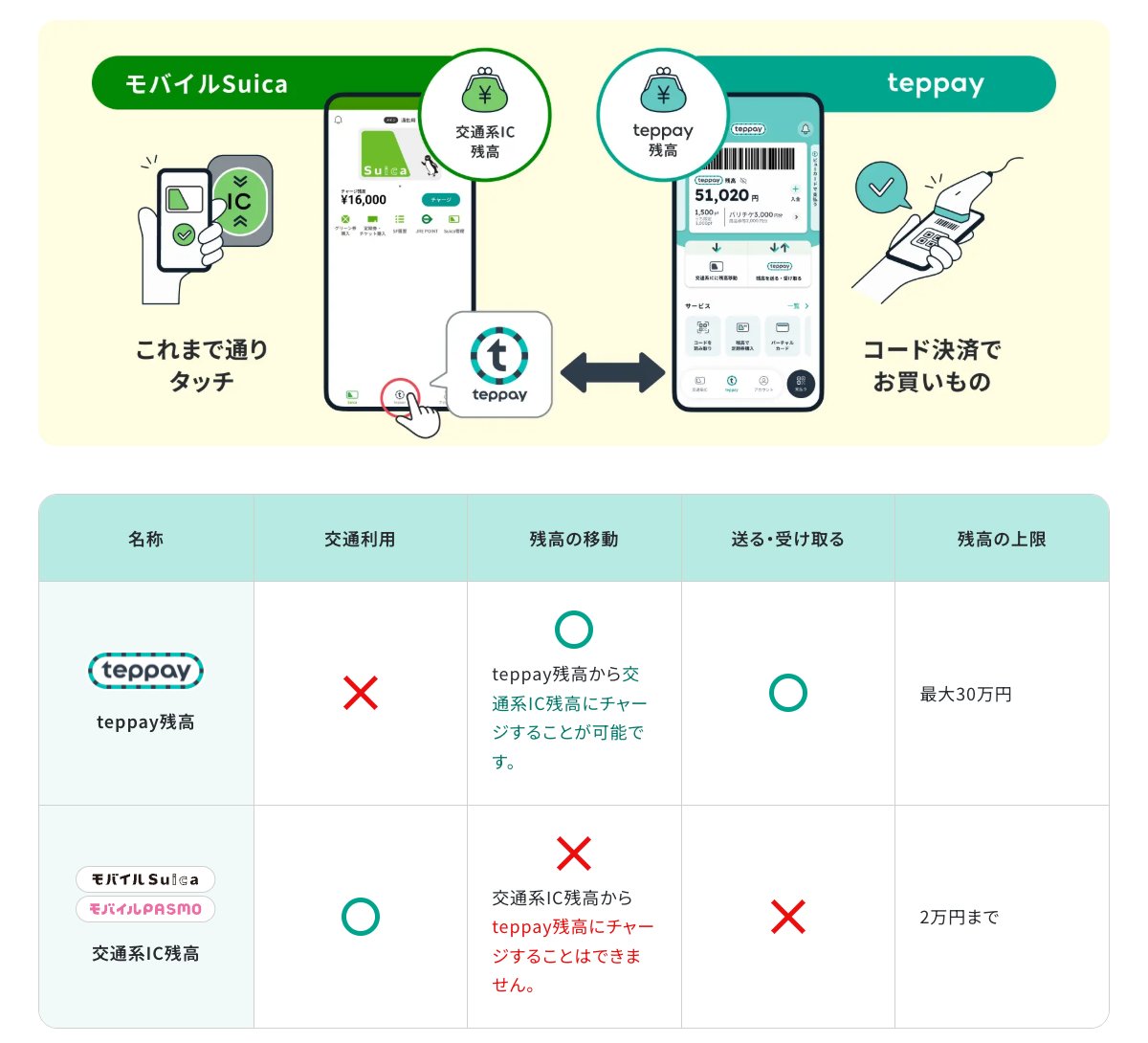
Not having a My Number card does not mean none of teppay’s features can be used; identity verification and bank top-ups are handled under the conditions above.
Bank Accounts and Debit Cards: The Base for Long-Term Living
A bank account in your own name is the base for long-term living in Japan, and it is the prerequisite for PayPay and teppay bank top-ups.
The Financial Services Agency’s guide for foreign residents lists the documents for opening an account, including a residence card, passport, employee ID or student ID; the actual documents vary by financial institution, and if the required checks cannot be completed you may not be able to open an account.
Once the account is open, it can be used for automatic debit of utility and phone bills, and financial institutions that offer the relevant service also accept debit card applications. Because a bank account is also the prerequisite for PayPay and teppay bank top-ups, Zagdim recommends that students and workers open an account first and set up wallets afterward. For account opening details, see “What foreigners need to open a bank account in Japan” (https://zagdim.com/japan-bank-account-ic-chip-id-check-foreigners/), and for phone numbers see the Japan phone number guide.
Can Your Tools From Hong Kong, Taiwan, Singapore or Malaysia Work in Japan?
Some work in Japan as a QR scan or a virtual card, but none of them taps Japanese ticket gates, as the table shows.
| Place | Tool | How it works in Japan | What to note |
|---|---|---|---|
| Hong Kong | Octopus Wallet, Octopus on mobile | A wallet upgraded to Plus or Pro verification, or Octopus on mobile linked to that wallet, can pay with Japan’s PayPay QR code | Some taxis, vending machines and PayPay Money-only shops are exceptions |
| Hong Kong | AlipayHK | On PayPay’s Alipay+ partner list | The user scans the shop’s QR code |
| Taiwan | EasyCard | At partner shops with terminals supported by the Bank of the Ryukyus; the shops listed officially are in Okinawa | Adult registered cardholders; not accepted across all of Japan |
| Mainland China | Alipay | On PayPay’s Alipay+ partner list | The user scans the shop’s QR code |
| Mainland China | WeChat Pay (China version) | On PayPay’s current partner list | The user scans the shop’s QR code; Money-only and online merchants are excluded |
| Singapore | EZ-Link Wallet with Mastercard | A virtual card in the SimplyGo app, used at supported overseas Mastercard merchants | Requires a valid NRIC or FIN; SimplyGo and Mastercard each charge 1% on overseas transactions |
| Malaysia | Touch ‘n Go eWallet | Japan is listed as a supported overseas QR country | 1% foreign exchange fee on overseas transactions |
A few points before you use them:
- A PayPay logo does not mean it works: The Alipay+ route applies only to shops that have enabled the service, and pays by the user scanning the shop’s QR code. It does not support the shop scanning your payment code, and it excludes online and dynamic QR cases. For convenience store scan methods, see the currency exchange guide.
- Hong Kong: AlipayHK and mainland China’s Alipay are two different products. PayPay’s list names the China version of WeChat Pay, and the same conditions cannot be applied to WeChat Pay HK.
- Mainland China: A shop accepting a wallet does not mean every kind of account can pay; if your account was registered with a foreign passport or linked to an overseas card, first check the overseas payment permission inside the app.
- Taiwan: The EasyPay app and the EasyCard are different services, so do not mix them up. The Bank of the Ryukyus page describes personal registration as open to Taiwanese, while EasyCard’s registration page also accepts foreign residents with a chip residence certificate, so foreigners living in Taiwan should confirm with EasyCard whether it can be used in Okinawa.
- Singapore: FIN holders must also provide MyInfo data and proof of address from less than 6 months ago. This virtual card does not mean every gate in Japan accepts it, and an ordinary physical EZ-Link card is not an interoperable card for Japan’s transit IC system.
- Malaysia: Topping up with a non-Malaysian credit or debit card costs up to 2.6% of the top-up amount, which is a separate charge from the 1% foreign exchange fee. The physical Touch ‘n Go card and the TNG Visa card should be considered separately.
FAQ
For a first trip to Japan, should I prepare cash, a credit card and a transit IC card?
Zagdim recommends having all three. The Japan National Tourism Organization suggests carrying cash against card errors, a transit IC card for riding, and for tap payment by credit card, check the symbols on both the card and the shop.
Can I apply for PayPay on a short tourist stay in Japan?
No. PayPay’s official site states that the service is for residents within Japan; merely obtaining a Japanese phone number does not mean a traveler meets the conditions. Travelers should look at cash, overseas cards and wallets from home.
Does teppay bank top-up accept only a My Number card?
Yes, according to the verification document FAQ: only a My Number card with a signature electronic certificate is accepted, and a residence card or passport cannot be used; the bank registration guide also requires identity verification first. The official limits table is worded differently, so it should not be treated as a route that skips verification. Go by the app screen and the official reply.
Can I get a refund on a Welcome Suica balance?
Not for the Welcome Suica products: the physical Welcome Suica does not offer a balance refund because a trip has ended; for Welcome Suica Mobile, unused balance is not refunded after expiry. Returning an ordinary Suica costs a 220 yen fee, and the 500 yen deposit is refunded.
Can one transit IC card be used from Tokyo to Osaka, or shared by family?
Not freely. Interoperability does not mean you can ride continuously across different IC regions, so check tickets separately for long trips. Tap-to-ride on Tokyo Metro cannot be shared by several people on one card, and a registered PASMO is also for the named holder only.
Can Octopus, EasyCard, EZ-Link and Touch ‘n Go tap straight through Japanese gates?
No, do not expect that. In Japan these work respectively as a phone wallet QR scan, at designated shops in Okinawa, or as a virtual Mastercard, which are different products from Japan’s transit IC cards.
A shop says it will refund me by PayPay. What do I do?
Stop first. On February 28, 2025, Japan’s Consumer Affairs Agency warned that some operators, in the name of refunding by QR payment such as PayPay, talk consumers into steps that end up transferring money out of their accounts.
Important Notice
This is general information, not financial, tax or legal advice. It is based on the official websites and membership terms of the Bank of Japan, the Financial Services Agency, the Consumer Affairs Agency, the Japan National Tourism Organization, and transport, payment and banking operators, checked on October 31, 2026. Fees, application conditions, accepted documents, top-up methods and partner shops change, so follow each agency’s and operator’s latest announcements. The tools listed here are a compilation of information, not a recommendation or ranking, and do not mean an individual account will pass an application.
Have a question about this guide? Leave a comment below, or ask Zagdim directly.
Your first stop for international property and global living.
Research and insights. Know what’s changing. Understand what matters.
Sources
- JR East: Official launch announcement of teppay (https://prtimes.jp/main/html/rd/p/000001553.000017557.html)
- JR East: Announcement of teppay start date and functions (https://www.jreast.co.jp/press/2026/20261006_ho03.pdf)
- teppay: Membership terms, Article 8 (https://www.teppay.jp/termslink/terms/)
- teppay: How to start using teppay (https://www.teppay.jp/guide/entry/)
- teppay: Bank account registration guide (https://www.teppay.jp/guide/charge/bank/)
- teppay: Documents accepted for identity verification, FAQ 88 (https://faq.teppay.jp/faq/show/88?site_domain=default)
- teppay: Identity verification documents for foreign nationals, FAQ 204 (https://faq.teppay.jp/faq/show/204?site_domain=default)
- teppay: Top-up limits table, FAQ 141 (https://faq.teppay.jp/faq/show/141?site_domain=default)
- teppay: Bank account registration order, FAQ 144 (https://faq.teppay.jp/faq/show/144?site_domain=default)
- teppay: My Number reading verification procedure, FAQ 123 (https://faq.teppay.jp/faq/show/123?site_domain=default)
- teppay: SMS number restrictions, FAQ 476 (https://faq.teppay.jp/faq/show/476?site_domain=default)
- teppay: Restrictions on registrable accounts, FAQ 130 (https://faq.teppay.jp/faq/show/130?site_domain=default)
- teppay: teppay and transit IC balances (https://www.teppay.jp/guide/charge/)
- teppay: Cash top-up at ATMs (https://www.teppay.jp/guide/charge/atm/)
- teppay: Registering View Card to top up teppay (https://www.teppay.jp/guide/charge/card/)
- PayPay: Service eligibility and restrictions on overseas access (https://paypay.ne.jp/help/c0487/)
- PayPay: Devices and phone numbers required to use PayPay (https://paypay.ne.jp/help/c0032/)
- PayPay: Identity verification for foreign nationals (https://paypay.ne.jp/help/c0118/)
- PayPay: Restrictions on identity verification documents (https://paypay.ne.jp/help/c0121/)
- PayPay: Changes to some identity verification application methods (https://about.paypay.ne.jp/pr/20261023/01/)
- PayPay: Types of PayPay balance (https://paypay.ne.jp/help/c0048/)
- PayPay: Bank account registration and top-up (https://paypay.ne.jp/article/0028/)
- PayPay: Alipay+ support at PayPay merchants in Japan (https://paypay.ne.jp/help-merchant/b0076/)
- PayPay: HIVEX partner wallets and acceptance restrictions (https://paypay.ne.jp/help-merchant/b0761/)
- PayPay: WeChat Pay joins PayPay announcement (https://about.paypay.ne.jp/pr/20250904/01/)
- Bank of Japan: Legal tender status of cash (https://www.boj.or.jp/about/education/oshiete/money/c08.htm)
- Japan National Tourism Organization: Guide to cashless payments in Japan (https://www.japan.travel/en/plan/cashless-payments-in-japan/)
- Visa Japan: Visa contactless payment (https://www.visa.co.jp/pay-with-visa/featured-technologies/contactless.html)
- Visa: DCC fees and choice (https://www.visa.co.uk/travel-with-visa/dynamic-currency-conversion.html?fsource=stcweb)
- Tokyo Metro: Tap-to-ride with credit cards and similar (https://www.tokyometro.jp/ticket/types/tap-to-ride/index.html)
- JR East: Ordinary Suica purchase, top-up and area of use (https://www.jreast.co.jp/en/multi/pass/suica.html)
- JR East: Ordinary Suica card refund (https://www.jreast.co.jp/suica/ic/procedure/repayment.html/)
- JR East: Welcome Suica physical card (https://www.jreast.co.jp/en/multi/welcomesuica/welcomesuica.html)
- JR East: Suica and Welcome Suica FAQ (https://www.jreast.co.jp/en/multi/faq/)
- JR East: Welcome Suica Mobile usage flow (https://www.jreast.co.jp/multi/wsmlp/)
- JR East: Welcome Suica Mobile expiry and fault handling (https://www.jreast.co.jp/multi/welcomesuicamobile/procedures.html)
- PASMO: TOURIST PASMO purchase and use (https://www.pasmo.co.jp/en/tourist-pasmo/)
- PASMO: Types of ordinary PASMO (https://www.pasmo.co.jp/en/use/)
- PASMO: PASMO phone and interoperability information (https://www.pasmo.co.jp/en/)
- PASMO: PASMO handling rules, Article 24 (https://www.pasmo.co.jp/condition/)
- PASMO: PASMO PASSPORT rules discontinuation notice (https://www.pasmo.co.jp/visitors/en/news/pdf/EN_20241004_Rules%20for%20Using%20PASMO%20PASSPORT.pdf)
- Tokyo Metro: PASMO deposit and long-term non-use rules (https://www.tokyometro.jp/en/ticket/pasmo/index.html)
- JR West: Ordinary ICOCA purchase screens (https://www.westjr.co.jp/global/en/howto/guide/movie03.html)
- JR West: ICOCA cash top-up photo guide (https://www.westjr.co.jp/global/en/howto/guide/movie04.html)
- JR West: ICOCA designed for foreign visitors (https://www.westjr.co.jp/global/en/howto/icoca/)
- JR West: ICOCA refund calculation (https://www.jr-odekake.net/icoca/guide/refund.html)
- JR West: Apple Pay ICOCA setup (https://www.westjr.co.jp/global/en/howto/icoca/applepay/)
- Apple: Using Suica, PASMO and ICOCA in Apple Wallet (https://support.apple.com/en-gb/HT207154)
- Octopus: PayPay QR payment in Japan (https://www.octopus.com.hk/tc/consumer/mobile-payment/paypay/about/index.html)
- Bank of the Ryukyus: EasyCard acceptance in Okinawa (https://www.ryugin.co.jp/biz/service/kameiten/easycard/)
- EasyCard: Adult and registered conditions for use in Okinawa (https://www.easycard.com.tw/faq?page=3)
- EasyCard: Registered EasyCard documents (https://ezweb.easycard.com.tw/eccl2/apply.action)
- SimplyGo: EZ-Link Wallet and Mastercard eligibility (https://www.simplygo.com.sg/faqs/ez-link-wallet/ez-link-wallet/)
- TNG Digital: TNG eWallet overseas QR guide for Japan (https://www.tngdigital.com.my/gotravel/overseas-qr/)
- TNG Digital: TNG eWallet product disclosure sheet (https://www.touchngo.com.my/assets/pdf/TNG_ewallet_PDS.pdf)
- Financial Services Agency: Guide to bank accounts and remittances for living in Japan (Chinese edition) (https://www.fsa.go.jp/user/04.chinese_2024.pdf)
- Consumer Affairs Agency: Warning on fake refund schemes that induce reverse transfers (https://www.caa.go.jp/notice/entry/041215/)